
Your Application Works With 100 Users. What Happens When 10,000 Show Up?
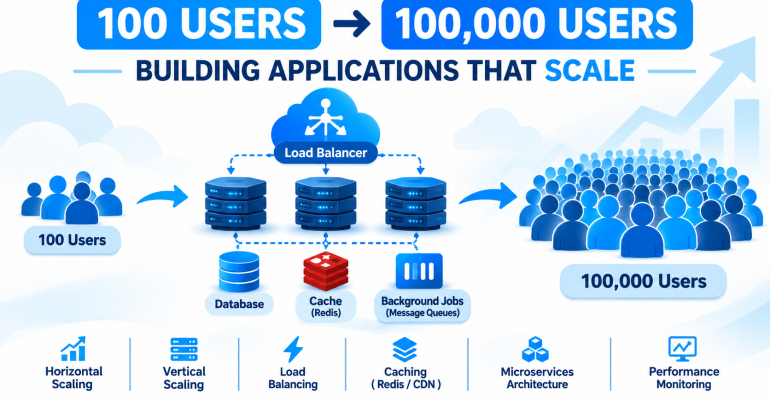
Your Application Works With 100 Users. What Happens When 10,000 Show Up?
 devops
The Real Test of Software Begins When More People Start Using It
Each and every application is simply fantastic and runs as smooth as silk straight from the box. The pages load fast, the buttons react at once, the APIs work as instant as it is possible and everything looks fine. During development and first tests, even an inexpensive and not very powerful server may cope with the job. But then the application grows up. There are more users, more people use it at the same time, there are more database queries and background tasks, and suddenly you find out that your great and fast application becomes slow, sometimes someone sees errors, someone else cannot use certain functionalities at all.
The developers are trying to find out the reasons and maybe more RAM, or more database resources or just more powerful hosting is required, sometimes it helps, but often this is not the problem at all. The fact is that application which works well for 100 users does not mean that it will work well for 100,000 users. Making the application work is one thing and making it keep working is another one. And here the scalability appears.
1. The Difference Between an Application That Works and One That Scales
For developers, the main consideration during development is functionality of the app. Can the application create user accounts? Is it possible to log in? Can it process requests? Is data in the database stored correctly? These are all important questions, yet they do not give any information on how the application would behave under load.
Consider a simple application for e-commerce.
It has just been launched, and it is used by around 100 people daily. The pages containing product descriptions are loading fast, users can add the goods to their shopping carts, and the checkout is working fine. Now assume that the company started advertising itself heavily. In no time, thousands of people began using the site. Hundreds of people want to purchase things simultaneously. The program may suddenly start to experience the following:
- Slow page loading when displaying product description and category pages.
- Slow response from APIs.
- Database connection limit capacity.
- Timed-out checkout request.
- Increased use of memory and CPU.
- Failed background operations such as order confirmation emails.
It doesn’t necessarily mean that the application has some bug in its system. It could just be receiving too many requests. Functionality solves the question “Does the application work?”. Scalability solves a much more crucial question which is “Can the application keep on working as it becomes busier?”.
2. More Users Are Not Always Equal to Increased Traffic
The common mistake that developers make while designing applications is treating an increase in the number of users as increased traffic. Actually, one user can perform many operations.
He or she can access the web site, check the product, search for information, update their own data, upload a file, ask for something, and do other stuff. Each of these operations will require one or more API calls, database queries, authentication operations, and other operations in the background. When there are hundreds or even thousands of users performing all these actions at once, the load increases rapidly. For example, let’s consider that each of these active users makes five API calls per minute.
In fact, even a simple operation like getting info from the cache uses almost no computing resources at all. Operations that scan lots of records in the database, produce some reports, or process an uploaded file require much computing power.
The thing is, the number of users of the application itself doesn’t really determine the computing power required. The number of users doing particular things at the same time is what matters.
3. The Database Usually Is the First Major Bottleneck
Even though an application can have an excellent server and a nice-looking UI, if the database itself fails to handle requests, everything will be slow. The database performs important operations like getting user info, saving the transactions, updating database records, and scanning application database. The increasing number of requests causes the increase in the number of database operations performed. But this bottleneck may appear not in the database itself.
Incorrectly optimized queries
Let us assume there is an application where there are 100 products shown on the list. The developer writes a query that will retrieve all the products along with their descriptions, pictures, and lots of other fields that are not required for this particular page. At this point there will be no problem since the number of the rows in the database is just several hundred. However, the more data appears, the more space, time, and unneeded transmission of the data the selection of unrequired information will require.
No use of database indexes
The use of database indexes allows fetching the information from the database in many cases without scanning the entire table. For instance, if we need to search for some orders using their order ID or filtering the rows by customer ID, then having proper indexes would allow doing the job much faster. If there were no indexes, the same operation would take significantly more time depending on the table size. Nevertheless, creating indexes everywhere is not a good practice since they consume extra storage space and have a cost of insertion
4. Why Adding More Servers Is Not Always the Answer
Improving server capabilities is the first solution when the application performance slows down. Upgrade the memory if your application consumes too many resources; get a better processor if it cannot manage the amount of data properly; increase the amount of hard disk space if you have problems with storing the data. It can help you solve the problem with the resources; however, it will not help you solve all possible architectural problems.
For example, an application is launched in the environment with 4 GB of memory. The traffic increases and the performance of the application starts decreasing. Developers get a new server with 16 GB of memory and a better processor. It helps the application become more productive for some time. But the performance of the application becomes slower again after some time.
Why?
The reason of low performance can be inefficient database requests, bad management of background processes, memory leaks, or any other problem connected with the architecture of the application. Upgrading hardware gives the application additional resources; however, it does not always increase the efficiency of the work of the application. Here are two popular solutions to increase the efficiency of the application.
Vertical scaling
Vertical scalability means enhancing the server’s capacity.
Examples include:
- Adding extra RAM from 8 GB to 32 GB.
- Switching to a CPU with more cores.
- Replacing the current server with a faster one.
This method is effective when there is an application with a fairly uncomplicated architecture. There are some restrictions to this approach as well. It cannot be used endlessly since hardware resources are limited and the cost of servers rises with their capacity. Moreover, a single server is still a single point of failure.
Horizontal scaling
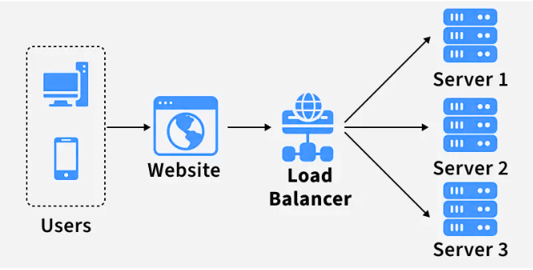
The horizontal scalability approach implies using more servers or instances of an application to distribute the workload. In other words, when not one server processes the application, but several can do it at once. The distribution of the workload is done by the load balancer.
Thus, if some application server is overloaded, new instances can be launched to process the incoming requests. Although the horizontal scaling offers more flexibility options, it increases the engineering challenges as well. For instance, the application sessions, files storing, background tasks, and sharing of the data should be considered

5. Caching: Stop Doing the Same Work Repeatedly
Not all requests need to be processed from scratch. There are applications where many similar requests arrive; however, the information required is not updated very often.
For example, there is a news website where everyone will read the same news. The application should query the database, process the information and create the same output for each person. It is meaningless. The caching technique enables you to avoid it. The application keeps the results for some time in order to use them later without doing the same work.
Application-level caching
Frequently asked data may be saved in the in-memory caching service like Redis. For example, an application could save product categories, user preferences or commonly needed configuration information. If the other request asks for the same information, the application will find it in the cache and not perform the same operation with the database again.
Browser caching
Browsers could keep static content like images, stylesheets, fonts and JavaScript files.
CDN caching
It is possible to use the Content Delivery Network (CDN) to spread static content on geographically dispersed servers. In such a case, when a customer asks for an image or any other cacheable content, it would be delivered from a close location without a need for each request to get to the main server of the application.
At the same time, caching requires careful consideration. If something was changed, but the old version still lies in the cache, then the customer will be served outdated information. Therefore, for example, an e-commerce website could not provide an outdated price of some product or outdated information about its availability. So caching should be used wisely.
6. Background Jobs: Keep Heavy Tasks Away from User Requests
Let us imagine a situation, when a client places an order via an e-commerce website. Then an application should validate the order, save it, change the inventory and process payment data, create an invoice and send a message. If all these actions are done sequentially, the client has to wait for several seconds.
In this case, there will be additional load on the application server, which will slow down the work. It is much better to separate those actions that do not require instant execution. In such a case, we should use background jobs and message queues. Message queue helps to put the tasks in the queue and process them by other workers.
Here is how it works:
1. The user makes an order.
2. The application verifies the data and saves the order.
3. The application puts the task into the queue.
4. The background worker performs the task related to the confirmation email.
5. Other workers may process tasks like generation of invoices.
There are various technologies available for this purpose including RabbitMQ, Apache Kafka, and Redis queue system. In this way, the application does not have to perform all of the actions in response to the user’s request. However, the background processing cannot be applied to the actions that must be performed properly. We should provide payment confirmation, consistency of the inventory, and order update properly.
7. Load Balancing: Distributing Traffic Instead of Overloading One Server
Application scaling poses the challenge of using just one application server, which will become insufficient due to traffic growth. Even if the server has enough resources today, it might experience a sharp rise in traffic. In order to alleviate such problem, load balancing becomes necessary to divide incoming requests between multiple instances of an application.
Let’s assume we have an application deployed on the following three servers:
- Server A
- Server B
- Server C
Once the users interact with the application, the load balancer receives incoming requests and redirects them to the available servers depending on the configuration strategy. This way, not all incoming traffic will be sent to one machine. Also, load balancers can check the health of the applications. Once one application instance becomes unhealthy, incoming traffic can be redirected to other healthy instances depending on the configuration. Some popular load balancers include Nginx, HAProxy and load balancing services of various clouds.
But adding multiple servers does not solve the problem by itself. It is necessary for the application to support sending any incoming request to any instance of the application. For example, it will be impossible to keep user session information on one server only.
8. Monolithic vs Distributed Architecture: When Should You Split an Application?
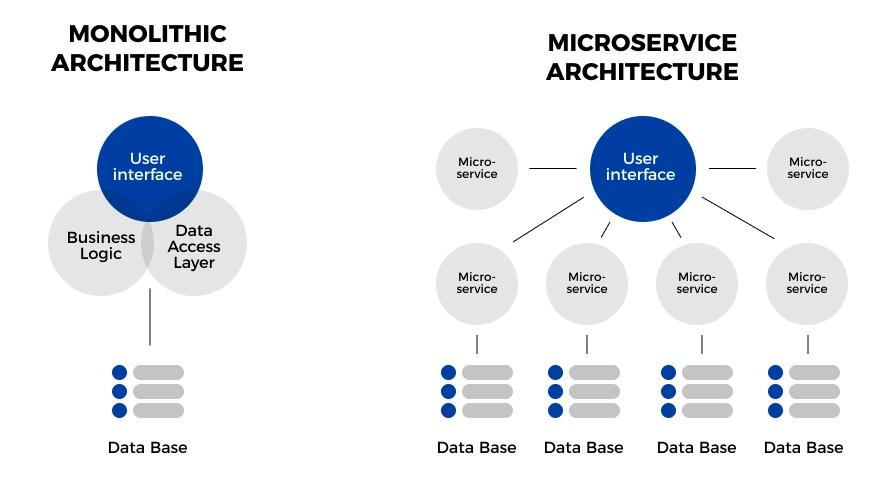
As applications become larger in size, teams may consider microservices. The point is to split the big application into small services that can be deployed separately. For example, e-commerce software could be divided into the following:
- User management service.
- Product catalog service.
- Order management service.
- Payment service.
- Notification service.
The service could be developed and deployed based on their own needs. If product browsing will get much more traffic compared to notification processing, then the product service will get additional capacity without having to scale all other services. However, microservices are not some kind of a miracle that solves all scalability problems. They will add extra complexity like communication between services, handling failures, distributed logging and monitoring, data consistency, authentication, and deployment coordination. There is no need to implement all that for a small application.
Well-designed monolithic application could handle plenty of traffic if its code, database, infrastructure, and deployment process are correct. Usually, it makes sense to start with modular monolith and have the application relatively simple and separated by responsibility in the code. Only when scaling needs appear, some parts of the system could be moved to separate services if there is a strong need for that.
Final Thoughts: Build for Growth, But Let Real Needs Guide You
The application that runs for 100 users has reached an important stage. However, with the increase in the number of users comes another range of engineering challenge. More users will mean more requests, more database calls, more background jobs, and more strain on the underlying infrastructure. If nothing is planned in advance, the application may turn out to be unstable despite all its qualities under increasing loads. This issue of scalability should not be addressed only after the application gains popularity. Scalability should affect decisions regarding database designing, developing APIs, managing resources, architecting, testing, and deploying from the very beginning. On the other hand, preparation for scaling up.