
Website Architecture: Browser to Server Explained
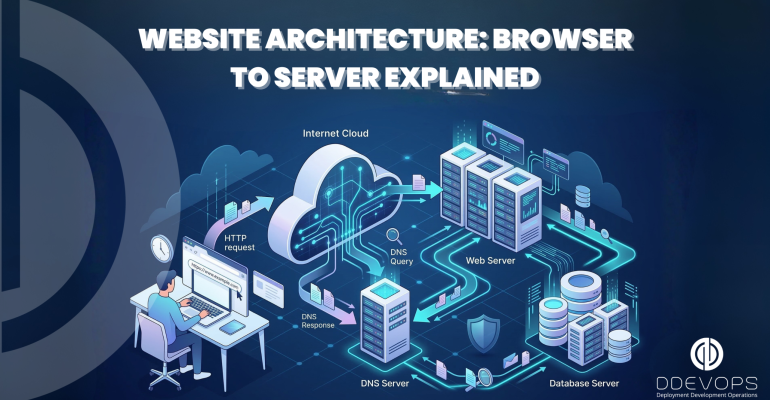
Website Architecture: Browser to Server Explained
 hamna Siddiqui
Discover how a website works behind the scenes—from browser request to server response, DNS lookup, and page loading explained step by step.
Table of Contents
- Introduction
- What Happens When We Type a URL
- DNS Request
- How it Works
- Cache Check
- DNS Resolver
- Root Server Query
- TLD Server Query
- Authoritative Server Query
- Response to Browser
- Server Response
- HTTP Request/Response
- Conclusion
Introduction
This document is a detailed analysis of the complex process that takes place when a person
enters a URL in their web browser. It explains in detail the process from the browser to the
server and back, discussing the process of DNS requests, server responses, HTTP requests,
HTTP responses, and rendering by the browser, giving an idea of the complex process that
takes place to give the user a seamless browsing experience.
What Happens When We Type a URL
What exactly happens when we type in any URL in the browser? Well, when we type in any
URL in the browser, it is actually performing a number of operations in the background to
Fetch us the webpage we are looking for. A URL is composed of a protocol, which is either
http or https, and then we have the domain name, which is www.example.com, and then we
may also have a path for some resource, which is /page1.
DNS Request
The first part of the process is the DNS request. The browser here needs to translate the domain name to an IP address, which is a unique number assigned to each server that is connected to the internet.
How it Works
Here is how it works:
Cache Check
The browser here checks to see if it has previously visited the site and stored the IP address
in its cache.
DNS Resolver
The browser then forwards the request to the DNS resolver, which is provided by the user’s
Internet Service Provider (ISP). The DNS resolver is actually the part of the DNS that performs
the DNS lookup.
Root Server Query
The DNS resolver then forwards the request to the root server to find out which server has
the information it is looking for.
TLD Server Query
The root server then forwards to the DNS resolver the information it has about the TLD server
that has the information it is looking for.
Authoritative Server Query
The DNS resolver then forwards the request to the authoritative server that has the
information it is looking for.
Response to Browser
Once the browser gets the information it is looking for, it then forwards it to the browser,
which then forwards it to the server.
Server Response
Now that the browser has the IP address, it can communicate with the server hosting the
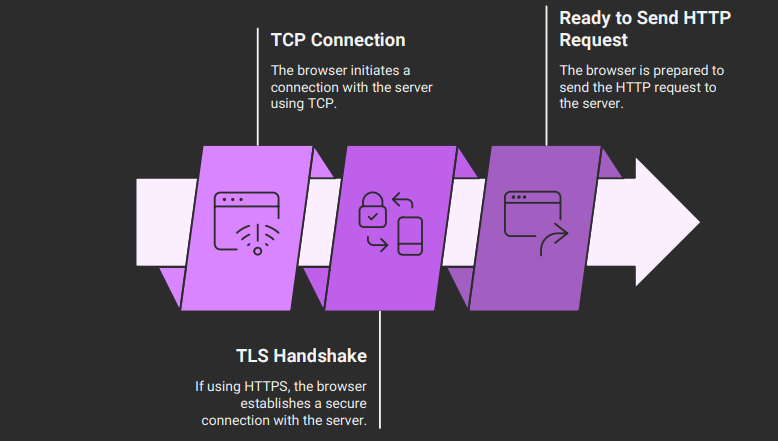
website it wishes to access. This is achieved through the establishment of a connection,
which is normally achieved through the Transmission Control Protocol (TCP). In the case of
HTTPS is achieved through the Transport Layer Security (TLS) protocol. The following is
What happens next:
TCP Connection: The browser sends a request to the server using the IP address through the
TCP protocol. This is achieved through the three-way handshake protocol.
TLS Handshake (in the case of HTTPS): In the case of an HTTPS protocol, the TLS handshake is
used to establish the connection with the server
Website Connection Process
HTTP Request/Response
HTTP request is a message sent to the server by the browser to request the resource
needed. It is composed of the following parts:
Request Line: This shows the type of HTTP request method needed, the path of the resource
requested, and the HTTP version.
Headers: These are the headers of the HTTP request and are used to send information
regarding the HTTP request. They can be the type of browser used (User-Agent), the type of
content accepted, and the cookies.
Body: This is the body of the HTTP request and is used when the HTTP request is of type
POST, where data is needed.
After the server has received the HTTP request, it will process it and send the HTTP response:
Status Line: This shows the HTTP version, the status of the HTTP request (200 for success and
404 for failure), and the reason for the status line.
Headers: These are the headers of the HTTP response and are used to send information
regarding the HTTP response. They can be the type of content and the size in bytes.
Body: This is the body of the HTTP response and is used to send the content needed by the
user.
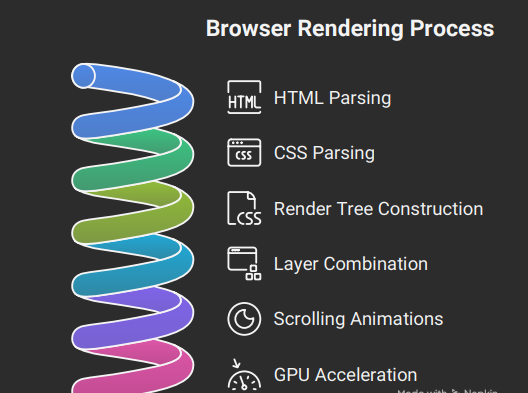
BROWSER RENDERING:
Concluding Note:
Typing a URL, clicking send, and viewing a webpage seems simple. It involves many steps done by different parts of a browser: DNS servers, web servers, and rendering engines. These parts work together to make interacting with web content easy. Learning about this process helps us understand web technology. It also gives us knowledge for web development. We learn about the role of browsers, DNS servers, and web servers. Browsers help us access web content. DNS servers translate domain names into IP addresses. Web servers. Send web pages. Understanding these components helps in building websites.
Reference links:
For more coding series:
Power of Microservices Observability
No-Code & Low-Code
Learning to Code: How to Think Like a Programmer
Written By Faheem Ahmed